
Unlocking Network Speed; The Case for BIND 9 Private DNS Servers
When diagnosing a sluggish internet connection, most users immediately blame their broadband package or Wi-Fi signal. However, a hidden bottleneck often lies in the Domain Name System (DNS). For tech-savvy households and small businesses in Malaysia using UNIFI broadband, moving away from ISP default settings to a private BIND 9 DNS server can result in a dramatic, measurable improvement in browsing speed and network reliability.
While many high-end routers—such as those running OpenWrt-based firmware, come with built-in DNS forwarders, deploying a full BIND 9 server changes the game from simply "forwarding" requests to intelligently managing them.
" All Shield Wire routers, both for home and enterprise users, are pre-configured with dual BIND 9 DNS servers available from one router box. No additional hardware or software required ! "
The Speed Logic: Why Cache Locality Wins
To understand the performance gain, you must understand how DNS resolution works. When you type a URL, your computer asks a DNS server, "Where is this website?" The server either knows the answer (cache hit) or has to ask several other servers across the globe (cache miss).
In a standard setup, your router forwards every unique query to UNIFI’s DNS or a public resolver like Google (8.8.8.8). While UNIFI generally provides low latency within Malaysia, every millisecond of external round-trip time (RTT) adds up.
BIND 9 operates differently. When configured as a caching and forwarding resolver, it stores the results of DNS queries locally on your router or server. The first visit to a site might take 90 milliseconds to resolve, but the second visit—and visits for all other devices on your network—drop to 0 milliseconds because the IP address is already sitting in the router’s RAM.
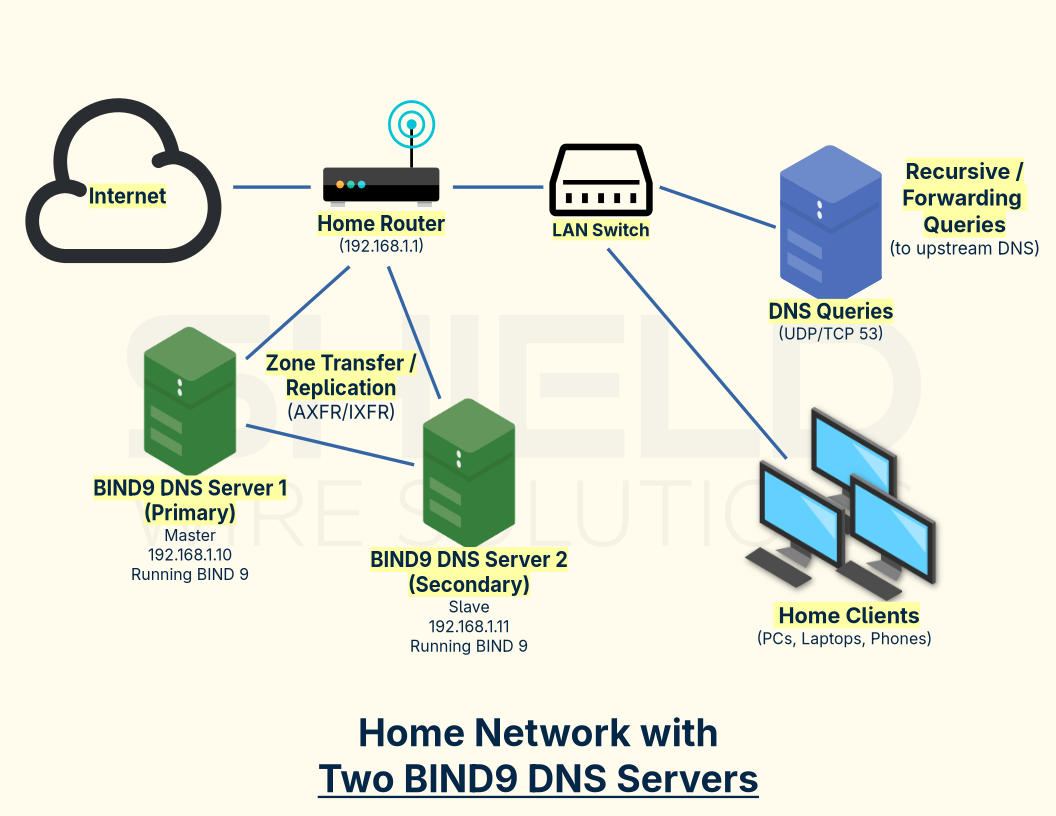
BIND 9 vs. Basic Router DNS
Most consumer routers include a dnsmasq forwarder. While functional, it lacks the advanced performance tuning and resilience of BIND 9. BIND is the same software that powers the global root DNS servers; it is built for high concurrency and aggressive caching.
The performance difference becomes glaring under load. In a small office with 20 devices, a basic router cache can be overwhelmed by simultaneous requests, leading to "timeouts" or queue lag. BIND 9 handles high query volumes with sophisticated memory management.
According to recent benchmarks by ISC (Internet Systems Consortium), modern BIND 9 versions (9.20) provide faster response times and better memory usage under load compared to legacy versions, ensuring that spikes in network activity don't translate to DNS delays.
Shield Wire Routers and UNIFI Optimisation
This is where hardware choice matters. Shield Wire routers - running lightweight Linux distributions - have a distinct advantage: they can run a full, persistent instance of BIND 9 via package managers (apk add bind or opkg install bind-server).
By installing BIND 9 directly on the router (as opposed to a separate server on the network), Shield Wire routers eliminate a network hop. The DNS cache resides on the same silicon that routes your packets.
For UNIFI broadband users in Malaysia, this solves specific pain points:-
- Mitigating International Latency: UNIFI traffic to international sites often routes through specific gateways. A BIND 9 cache on your Shield Wire router ensures that repeated queries for github.com or google.com never leave your local LAN again after the first lookup.
- Handling ISP Fluctuations: If UNIFI experiences a routing hiccup to their primary DNS, your local BIND server keeps serving cached records, maintaining LAN stability even during minor WAN glitches.
Blocking Ads Before They Load (Performance RPZ)
Speed isn't just about lookup times; it's about payload size. A massive performance-oriented improvement in BIND 9 is the Response Policy Zone (RPZ) feature.
In a standard network, your browser loads a webpage, then requests an ad server, downloads the ad, and renders it—consuming bandwidth. With BIND 9’s RPZ, you can create a blocklist. When an ad domain is requested, BIND returns a null response (or 0.0.0.0) without ever sending the query upstream.
This is a "negative cache" performance win. The router knows instantly that the domain is blocked, dropping the request locally. This reduces bandwidth usage and drastically speeds up page rendering times on UNIFI’s "UniFi" plans, where every megabyte counts.
Practical Implementation for Power Users
Implementing this requires moving away from the stock "plug-and-play" setup. Here is how to prioritize speed in your named.conf:-
- Increase Cache Limits: Default cache sizes are often 32MB. For a small business, set max-cache-size 250M; to ensure frequently accessed records aren't prematurely flushed.
- Enable Prefetch: Use prefetch 10 3; to instruct BIND to refresh a popular record just before it expires, ensuring users never hit a "cache miss" on a popular site.
- Forwarders: Configure BIND to forward to UNIFI’s low-latency local servers or Cloudflare (1.1.1.1) for the initial cache fill, balancing local ISP routing with global privacy.
Conclusion
For the Malaysian power user on UNIFI, the difference between a slow network and a snappy one often lies in the nanoseconds of DNS resolution. By deploying BIND 9 on a capable Shield Wire router, you transform your router from a simple traffic cop into a local DNS authority.
You reduce reliance on external UNIFI resolvers, lower bandwidth usage by blocking ads at the DNS level, and provide a "LAN-speed" experience for every website visit after the first click. It is the single most effective performance upgrade for a home or small business network that doesn't cost a single sen in monthly fees.