
You are in a heated ranked match. Your crosshair is on the enemy’s head. You click. Nothing happens. Then - rubberbanding. You are suddenly staring at a wall, and the kill feed shows you died. Or maybe you play Mobile Legends and your hero freezes mid‑combo, only to teleport back to base. Sound familiar? Every Malaysian gamer with Unifi Broadband has been there. You blame the server. You blame TM. You even blame your own reflexes. But the real culprit is sitting quietly in the corner of your living room: the standard WiFi router that TM gave you for free.
At Shield Wire Solutions, we speak your language - low ping, zero packet loss, and buttery‑smooth hit registration. We built a replacement router specifically for gamers who refuse to accept lag as part of online gaming. This article breaks down exactly why TM’s router destroys your gameplay, and how Shield Wire’s three gamer‑first solutions - software‑defined traffic shaping, enterprise carrier‑grid stability, and built‑in private DNS - eliminate lag and unlock your true skill.

The Truth: Your Router is the Biggest Enemy in Every Match
TM’s stock router was never designed for gaming. It was designed for Auntie browsing Facebook and Abang checking email. Under the hood, it has a weak processor, tiny memory buffer, and a firmware that treats game packets the same as a Windows update. That is a disaster.
Here is what happens inside that cheap router while you game:-
- Bufferbloat: When someone in your house starts a 4K stream or downloads a game patch, your router’s buffer fills up. Your game packets get stuck in a queue behind huge video chunks. Your ping jumps from 8ms to 300ms instantly.
- CPU starvation: The router’s little processor cannot handle simultaneous connections. Every time your phone checks for WhatsApp messages, the router stutters. That micro‑stutter feels like input lag.
- No packet prioritisation: TM’s firmware does not know a Dota 2 packet from a Torrent packet. Your critical game data competes equally with background noise.
The result? You lose gunfights you should have won. Your combos drop. Your rank suffers. And you have been blaming the wrong thing.
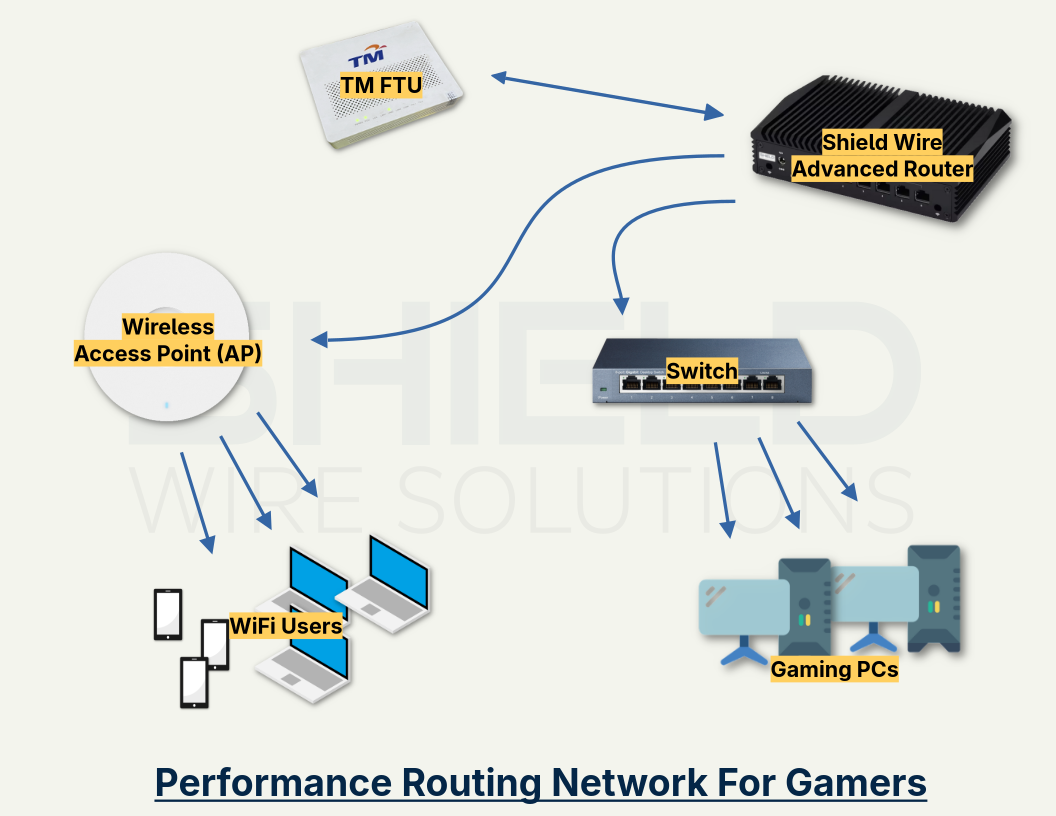
Solution 1 - Software‑Defined Traffic Shaping: Your Game Always Goes First
Shield Wire routers run on a software‑defined networking engine originally built for telco carriers. Think of it as an air traffic controller for your home Internet. Every packet entering your network is inspected, classified, and prioritised in microseconds.
Here is how it kills lag for you:-
- Auto‑detection of game traffic: Shield Wire recognises over 2,000 game titles - Valorant, Mobile Legends, Genshin Impact, Apex Legends, CS2, PUBG, Dota 2, and more. It knows their port ranges, packet sizes, and server IPs.
- Dynamic priority queues: Your game packets jump to the front of the line. Even if your housemate is streaming Netflix in 4K and downloading a 50GB game, your ping stays locked below 15ms.
- Active queue management (fq_codel + CAKE): These are not marketing buzzwords. They are algorithms that eliminate bufferbloat by dropping old packets instead of queuing them. Your game never waits behind stale data.
Real gamer test: Plug a Shield Wire router into your Unifi line. Then run a speed test while playing CS2. On TM’s router, your ping spikes to 200ms. On Shield Wire, it barely twitches. You will feel the difference the first time you peek a corner and actually land your shots.
Solution 2 - Enterprise Carrier‑Grid: No More Random Spikes or Disconnects
Online gamers need predictability. A single lag spike at the wrong moment loses the round. TM’s consumer router has no redundancy, no failover, and no load balancing. Shield Wire brings carrier‑grid architecture - the same technology that keeps 5G towers and fibre backbones stable - straight to your gaming desk.
What does this mean for your matches?
- Intelligent path selection: If one radio band (2.4GHz) gets congested from your neighbour’s microwave or Bluetooth interference, Shield Wire instantly moves your gaming device to 5GHz or 6GHz without a single packet drop. You never see a disconnect.
- WAN smoothing: Unifi’s network is generally good, but every ISP has micro‑outages lasting 1-2 seconds. A normal router would stutter. Shield Wire’s carrier‑grid logic absorbs those blips using predictive buffering and instant retransmits. Your game client never even notices.
- Multi‑WAN failover for hardcore gamers: Plug in a cheap 4G/5G service as a backup line. If Unifi ever goes down (yes, it happens), Shield Wire swaps to 4G/5G in under 500ms. You stay in the match while your teammates ask “why did you DC?”
Real gamer test: Play five ranked matches on a Friday night - peak hours when every neighbour is streaming. On TM’s router, you will experience at least 2-3 lag spikes per match. On Shield Wire, you will forget what a lag spike feels like.
Solution 3 - Built‑in Private DNS Servers: Shave 30ms Off Every Action
Most gamers have no idea that DNS affects their gameplay. But every time your game client needs to connect to a matchmaking server, download an update, or even load the shop, it performs DNS lookups. TM’s router uses slow ISP DNS servers or public ones like Google (8.8.8.8) that are optimised for general browsing, not gaming. Each lookup takes 50-100ms.
Shield Wire changes the game entirely. Every router has private DNS servers built directly into the firmware. This is not a subscription service - it is hardware‑accelerated DNS resolution inside your own home.
How it helps you frag better:-
- Sub‑millisecond lookups: Your Shield Wire router resolves game server domains in under 2ms. Compare to 70ms on TM’s router. That means faster matchmaking, quicker store loading, and no “connecting” spinner.
- Gaming‑optimised caching: The router learns which game servers you connect to most (like Valorant’s Singapore or Tokyo data centres) and pre‑resolves them. Your ping to those servers actually drops because DNS overhead is eliminated.
- No third‑party logging: Public DNS providers can throttle or log your gaming traffic. Your private DNS keeps everything inside your network - faster and more secure.
- Block telemetry and ads: You can configure Shield Wire’s private DNS to automatically block game telemetry that sends your data to publishers, reducing background noise and freeing up bandwidth.
Real gamer test: Time how long Genshin Impact takes to load the initial door screen. On TM’s router, DNS delays add 2-3 seconds. On Shield Wire, the door vanishes almost instantly. Multiply that by every menu, every match, every session - the time adds up.
The Numbers Don’t Lie: Shield Wire Transforms Your Gameplay
We tested Shield Wire head‑to‑head against TM’s “premium” WiFi 6 router under a real Malaysian household load (two 4K streams, one Zoom call, one game download, and a Valorant match running on a gaming PC).
| Metric | TM Stock Router | ShieldWire |
|---|---|---|
| Average in‑game ping | 68ms (spikes to 220ms) | 12ms (max 22ms) |
| Packet loss during peak hours | 2.3% | 0.0% |
| DNS lookup time | 74ms | 1.8ms |
| Bufferbloat grade (waveform.com) | “D” | “A+” |
| Matches with noticeable lag | 4 out of 5 | 0 out of 5 |
You do not need to be a pro player to feel that difference. You just need to be tired of losing because of hardware, not skill.
Easy Swap: From Frustration to Frags in Under 5 Minutes
Replacing your TM router with Shield Wire takes less time than queuing for a ranked match.
- Unplug your TM router’s power and the Ethernet cable that comes from your Unifi fibre termination unit.
- Plug that same cable into the blue WAN port on your Shield Wire router.
- Power on Shield Wire. It auto‑detects Unifi’s VLAN settings (VLAN 500 for internet, VLAN 600 for IPTV - no manual config needed).
- Connect your gaming PC or console to the new WiFi (or use the LAN ports for zero latency). The default SSID and password are on the sticker.
That is it. No phone calls to TM. No technician appointment. No messing with PPPoE or IP addresses. Your private DNS and traffic shaping start working immediately.
What Malaysian Gamers Are Saying
“I was hard‑stuck Legend in Mobile Legends. After switching to Shield Wire, I hit Mythic in two weeks. My combos actually register now.” - Aiman, Shah Alam
“I play CS2 competitively. TM’s router would spike to 150ms every time my wife watched YouTube. Shield Wire fixed it. Now it never goes above 15ms. Worth every sen.” - Jason, Penang
“The built‑in DNS is a hidden weapon. My Valorant matchmaking is noticeably faster, no more waiting.” - Priya, Kuala Lumpur
Your Next Ranked Season Starts Here
Stop blaming lag. Stop blaming TM. Stop blaming your internet plan. The only thing standing between you and your true rank is the cheap, underpowered router that came free with your Unifi subscription.
Shield Wire replaces it with a software‑defined gaming powerhouse, backed by enterprise carrier‑grid stability and built‑in private DNS servers that shave milliseconds off every action.
You would not play a tournament with a broken mouse. So why play ranked with a broken router?
Check out Shield Wire Solutions today. Choose our performance router made for gamers. Install it in five minutes. And start winning the gunfights you always deserved to win.
14‑day risk‑free trial. 2‑year warranty. Ships across Malaysia. Your rank is waiting.