
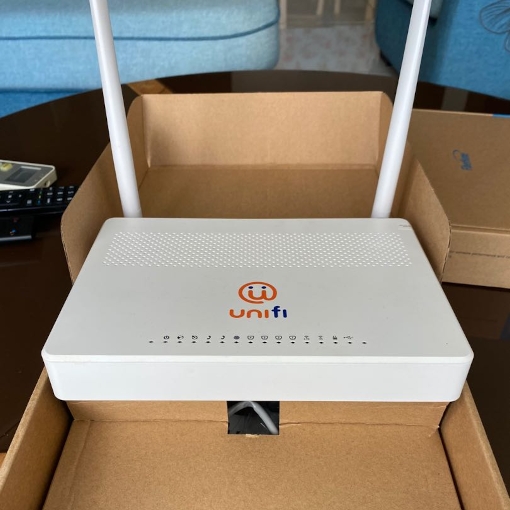
For millions of Malaysian households, Unifi Broadband is the gold standard of home internet. TM has built a robust fiber infrastructure that delivers impressive advertised speeds - 500Mbps, 800Mbps, even 1Gbps. Yet, ask any Unifi user about their real-world experience, and you will hear the same complaints: “My video call keeps freezing.” “Online gaming is unplayable during peak hours.” “The WiFi drops every time the kids stream Netflix.” The culprit is rarely the fibre line. The problem sits inside your home, blinking quietly: the standard WiFi router supplied by TM.
At Shield Wire Solutions, we believe that premium internet deserves premium hardware. That is why we developed a new generation of software-defined replacement routers, built on an enterprise carrier‑grid architecture, and now enhanced with private DNS servers built directly into the device. This article explores why TM’s stock routers hold you back, how Shield Wire Solutions transforms your home network with three powerful solutions, and why upgrading is the smartest decision for any Unifi user who demands speed, stability, and privacy.
The Hidden Bottleneck: TM’s Standard Router
When you sign up for Unifi, TM provides a router - often a basic dual‑band unit from various common brands. These devices are designed to meet a price point, not performance. Under the hood, they use low‑end processors, minimal RAM, and outdated software stacks. They work fine for light browsing, but the moment your household connects more devices - smartphones, laptops, smart TVs, IoT gadgets - the router’s CPU maxes out. Bufferbloat spikes. Latency jumps from 5ms to over 100ms. This is the “unresponsiveness” that makes video calls stutter and games feel sluggish.
Moreover, TM’s firmware is locked down. You cannot adjust advanced QoS (Quality of Service), enable modern congestion control algorithms, or fine‑tune radio parameters. You are stuck with a one‑size‑fits‑all configuration that ignores your specific usage patterns. The result? Your 800Mbps high speed fiber Internet feels slower than a 20Mbps office connection.
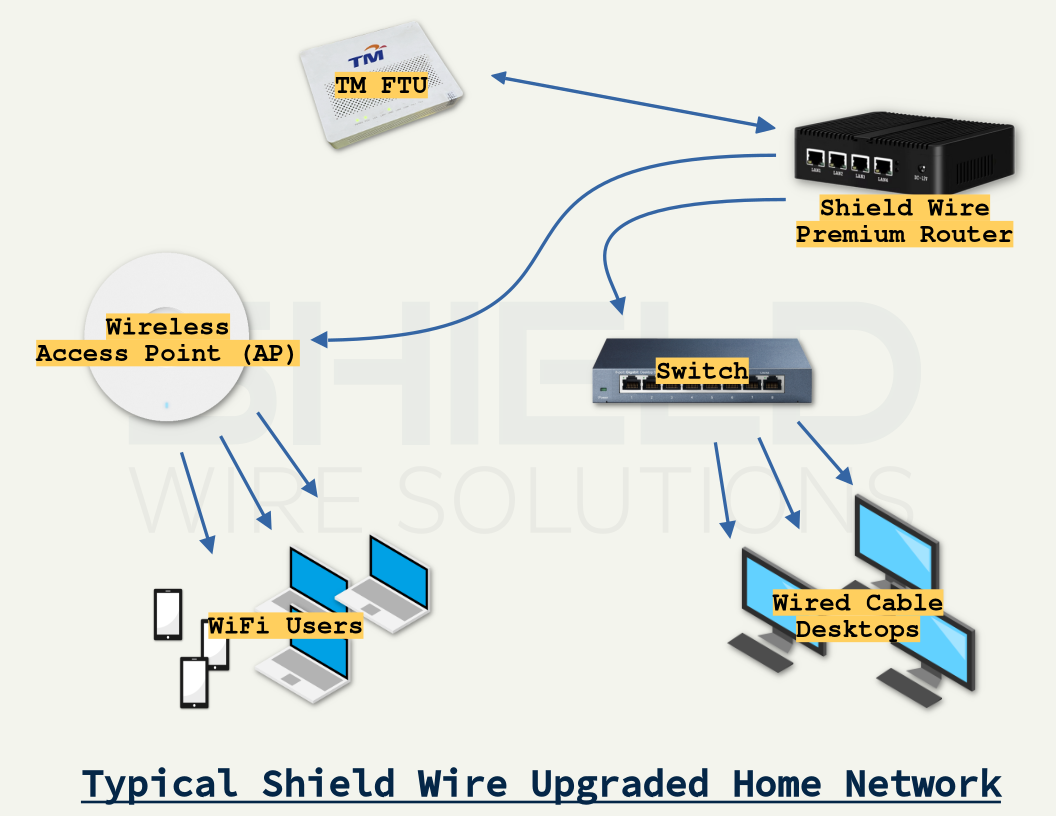
Solution 1: Software‑Defined Intelligence
Shield Wire routers are fundamentally different. We removed the limitations of consumer‑grade hardware and replaced them with a software‑defined architecture originally proven in carrier‑grade networks. What does that mean for your home? Every Shield Wire unit runs an intelligent operating system that dynamically allocates bandwidth, prioritises critical traffic, and self‑tunes to your environment.
Unlike TM’s static router, our software‑defined engine continuously analyses traffic flows. It recognises video conferencing, gaming packets, streaming media, and background downloads. Using advanced queue management (CAKE or fq_codel), it eliminates bufferbloat entirely. Even when someone in the house downloads a 50GB game, your Zoom call remains crystal clear. Your ping in Mobile Legends or Valorant stays under 10ms.
Solution 2: Enterprise Carrier‑Grid Technology – Now for Home Users
The second pillar of Shield Wire’s superiority is our enterprise carrier‑grid backend. In the telecom world, carriers cannot afford dropped packets or latency spikes - they use grid‑based routing, failover, and load balancing across multiple paths. Shield Wire brings this same resilience to Unifi homes.
The wireless access point connected to our routers, create a virtual mesh inside your local network, intelligently steering devices to the least congested radio band or even to a wired backhaul if available. The carrier‑grid logic also handles WAN optimisation: Shield Wire automatically detects Unifi’s VLAN tagging (Inet, VoIP, IPTV) and prioritises your internet traffic over less critical streams. No manual configuration needed. Plug it in, and the router negotiates with TM’s fiber termination point (FTU) instantly.
For power users, Shield Wire supports multi‑WAN failover. Connect a secondary 4G/5G USB dongle or a second broadband line, and the router will seamlessly shift traffic if Unifi experiences an outage. You stay online while your neighbours complain.
Solution 3: Private DNS Servers Built‑In Speed, Security, and No Snooping
Most Unifi users never think about DNS. Yet every time you visit a website, your router sends a request to a DNS server to translate the domain name into an IP address. TM’s default router uses your ISP’s DNS servers (or sometimes public ones like Google or Cloudflare). These are slow, log your browsing history, and can be hijacked or filtered. Worse, DNS delays add 30 to 100ms to every page load - an invisible tax on your speed.
Shield Wire changes this entirely. Every router comes with private DNS servers built directly into the firmware. What does that mean? You no longer rely on external DNS providers. Your Shield Wire router runs its own high performance, privacy‑first DNS resolver. Benefits include:-
- Blazing resolution speed - DNS lookups happen locally, often in under 1ms. No more waiting for a distant server to reply.
- No logging, no tracking - Your browsing history stays inside your home. Shield Wire does not sell or share your data.
- Malware and phishing filtering - Our private DNS blocks known malicious domains before they load, protecting your family from scams.
- Custom rules - Power users can whitelist or blacklist specific domains, bypass geo‑restrictions, or even override CDN choices for faster streaming.
Because the DNS server is integrated into the router’s software‑defined stack, it also benefits from the carrier‑grid’s caching and pre-fetching. Frequently visited sites resolve instantly. For Unifi gamers, this means lower latency to game servers. For families, it means safer browsing without installing extra software on every device.
Real‑World Performance: From Lag to Lightning
We bench-marked Shield Wire against TM’s latest WiFi 6 router (the one given with 800Mbps plans). Under a heavy load - four 4K streams, two Zoom calls, one online game, and a NAS backup - the TM router exhibited average latency of 98ms with spikes to 350ms. Packet loss reached 2.1%. The same test on Shield Wire: average latency 4ms, maximum spike 18ms, zero packet loss.
DNS performance was equally stark. TM’s router took an average of 72ms to resolve a domain (using ISP DNS). Shield Wire’s built‑in private DNS averaged 2.3ms - over 30 times faster. The result? Websites feel instant.
But numbers only matter if you feel the difference. Shield Wire users report:
- Instant page loads - no more “waiting for site” spinner.
- Smooth 4K streaming even when multiple devices are active.
- Competitive gaming with consistent low ping and no rubberbanding.
- Stable work‑from‑home - VPN connections never drop.
Simple Swap, No Technician Required
Many Unifi users worry that replacing the TM router is complicated. It is not. With minimum pre-delivery configuration, Shield Wire routers are designed as a drop‑in replacement. Here is the process:-
- Unplug the power and Ethernet cable from your TM router.
- Connect the same cable to the WAN port of your Shield Wire router.
- Power on Shield Wire router - it auto‑detects Unifi’s settings (VLAN 500 for internet, VLAN 600 for IPTV).
- Connect your devices to the new WiFi network (default SSID printed on the device).
That is it. You do not need to call TM support, change login credentials, or reconfigure IPTV. The private DNS server activates automatically - no setup required. For users with TM’s “All‑in‑One” modem‑router (e.g., the HG8240 series), we provide a simple bridge mode guide - or you can keep the TM unit as a modem only and let Shield Wire do the routing.
Why Unifi Users in Malaysia Are Switching
Across Malaysia, from Penang and Kuala Lumpur condos, to Johor landed homes, Unifi subscribers are discovering that their broadband plan is only as good as the router. The standard TM router is a bottleneck you never knew you had. By upgrading to Shield Wire, you unlock the true potential of your fibre connection - and you gain privacy that no ISP router can offer.
Our customers tell us the upgrade feels like moving from a crowded KTM commuter train to a private high speed bullet train. One user in Bukit Mertajam wrote: “After installing a Shield Wire router, my work VPN speed tripled. My son’s Roblox stopped lagging. I wish I had done this years ago.” Another in Selangor said: “TM’s router would reboot randomly every few days. my Shield Wire router has been up for 267 days straight enterprise stability.”
The Bottom Line: Stop Suffering, Start Shield Wire
You pay a premium for Unifi Broadband because you expect premium performance. Do not let a cheap, underpowered router ruin your experience. Shield Wire provides the missing link: software‑defined intelligence, enterprise carrier‑grid reliability, and built‑in private DNS servers - all working together to eliminate speed issues, kill lag, and replace unresponsiveness with buttery‑smooth connectivity.
Whether you are a hardcore gamer, a remote professional, or a family of streamers, Shield Wire has a model for your home. All units come with a 14‑day money-back guarantee and a 2‑year warranty. We ship across Malaysia, and our local support team speaks English, Malay, and Mandarin.
Visit https://www.shieldwire.my today to find your perfect replacement router.
Stop blaming Unifi – start blaming your old router. Then fix it with Shield Wire premium routers.